

You know how frustrating it is when leads message your business late at night and slip away before morning.
Whatsapp automation for business solves this exact problem by capturing attention instantly. It immediately stops the clock on customer wait times.
Our team sees this happen constantly across local companies. This guide breaks down exactly why having a proper setup is no longer optional for growth.
Following these steps will put you ahead of the competition. We will show you exactly how to solve this using a simple, effective flow.
Implementing these steps will help you stop losing sales to faster competitors. That translates directly into more revenue for your business. Our WhatsApp Lead Generation setups are built deliberately to handle that critical first interaction.
What WhatsApp automation for business is actually for
Automation is not meant to replace your team, but rather to stop the clock and secure the lead. A fast automated reply handles the first sixty seconds and answers repetitive questions instantly.
Our market research highlights exactly why this matters for local companies right now. The numbers in Ghana are particularly revealing.
- Massive Local Reach: Ghana currently has over 8 million active WhatsApp users.
- Incredible Engagement: WhatsApp messages boast an average 98% open rate compared to traditional email.
- Instant Gratification: Customers expect a response in under 10 minutes.
Without a system, a customer who messages at 8:47 pm gets silence. They will simply message two competitors by morning. With an automated flow, that same customer gets an immediate greeting and often a direct answer to their question.
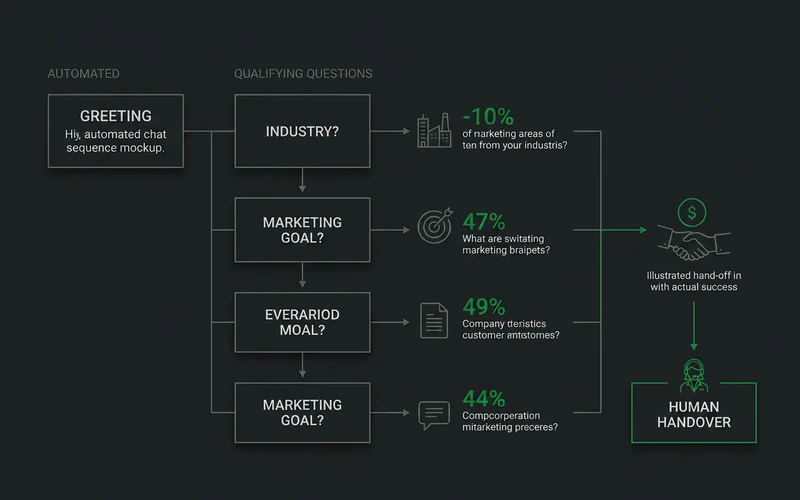
The flow, in order
A successful automated flow moves logically from a greeting to qualifying questions, provides quick replies, and finishes with a human handover. Every step must feel natural and helpful.
Our recommended sequence keeps the customer engaged while gathering essential details for your staff. Here is the exact order you should build out.
- Greeting message. Fires on first contact. Should acknowledge, identify the business, and set an expectation. “Thanks for messaging Whizzy Digital. We have got your message and someone will reply within the hour during business hours. In the meantime, which service are you asking about?”
- One or two qualifying questions. Not five. Ask which service they need or one detail that determines who should reply. Location, urgency, or job size are genuinely decisive factors for local service providers.
- Quick replies for the repeat questions. Using quick replies whatsapp features saves massive amounts of time. Price ranges, opening hours, and service areas get asked constantly. Answering them instantly frees your team for conversations that matter.
- Catalogue, where relevant. If you sell defined products, a catalog lets people browse without asking.
- Handover. Create a clear moment where a person takes over, ideally announced. “Kwabena will take it from here.”
Which questions to automate
You should only automate questions where every possible answer routes cleanly to a specific outcome. Anything requiring interpretation, reassurance, or negotiation belongs to a person.
Our rule of thumb is to look for yes/no or multiple-choice scenarios. “Which service are you interested in?” routes cleanly because the answer determines who replies. “Which area are you in?” also works perfectly.
“What is your budget?” does not route well. The honest answer is often “I don’t know,” and an automated flow handles that badly.
A customer describing a problem in their own words needs someone who can read it. They definitely do not need a restrictive menu.
The automation failure everyone recognises
A bot that keeps offering menu options while the customer types an increasingly frustrated description of their actual problem. That is worse than no automation, because it signals the business is not listening.
Response time is the whole game
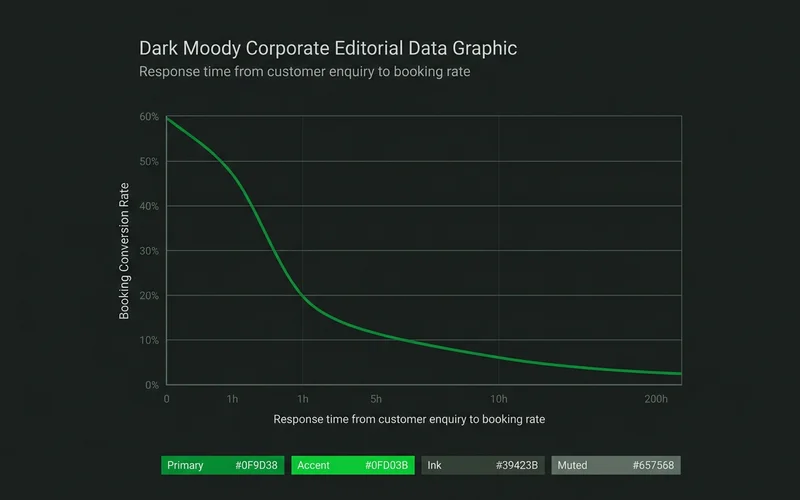
Speed is everything because responding within five minutes can increase conversion rates by up to 400%. Enquiry-to-booking rates fall sharply after the first hour and keep falling through the day.
Our clients see a massive difference when they eliminate manual delays. By the next morning, a substantial share of those unread conversations are gone. These customers are not annoyed, just already served by someone who answered faster.
| Response time | Practical outcome |
|---|---|
| Under 5 minutes | Highest conversion, customer still in buying mode |
| Under 1 hour | Good, most enquiries still live |
| Same day | Noticeably weaker, competitors have replied |
| Next day | Most already gone |
Set an internal standard and staff it actively during business hours. You must also keep in mind Meta’s strict 24-hour response window for business accounts.
If you fail to reply within 24 hours, you lose the ability to send standard free-form messages. This simple rule makes automation essential for weekend inquiries.
Away messages that actually work
A highly effective away message contains three specific elements to keep prospects engaged. This prevents the potential customer from bouncing to another provider.
- An immediate acknowledgment of their message.
- A clear return time setting expectations.
- A valuable resource to read in the meantime.
Our standard template is simple and effective. It starts with a friendly acknowledgment.
“Thanks for messaging us,” works perfectly. We then set clear expectations by stating we are closed until 9am tomorrow.
If the matter is urgent, providing a phone number is a great idea. Meanwhile, linking to your prices keeps them reading.
That last resource link matters significantly. Someone messaging at 10 pm is actively researching.
Giving them a catalog or pricing page keeps them engaged. It prevents them from visiting a competitor’s website instead.
When to add ManyChat
You should upgrade to a platform like ManyChat when you need complex branching logic. It is also useful if you want to manage Instagram and WhatsApp together.
For most local businesses starting out, the native WhatsApp Business tools are enough. The standard app covers greetings, away messages, quick replies, and your product catalog.
Our advice is to start natively and only add third-party tools when a specific limitation costs you money. If your enquiry volume grows, you might want a sophisticated whatsapp chatbot ghana users can interact with easily.
This is when a dedicated manychat whatsapp integration becomes incredibly useful. Before jumping in, you should understand the updated pricing model for 2026.
Here are the current starting tiers to consider.
- Essential Plan: Starts at $17 per month and includes up to 250 active contacts.
- Pro Plan: Starts at $39 per month for up to 2,500 contacts and unlocks advanced tools.
- Meta API Costs: WhatsApp also charges small per-message fees for marketing broadcasts, usually around $0.03 per message in Ghana.
Add third-party software when manual labeling becomes a job in itself. You should not buy it just in anticipation of future growth.
Organising the inbox
Labels are the most underrated feature for turning a chaotic inbox into an organized sales pipeline. Applied consistently, they make it possible for any team member to pick up a conversation instantly.
Our workflow relies heavily on specific categories to maintain order. Using these tags means the customer never has to repeat themselves when a different staff member logs in.
- New Enquiry: Needs immediate qualification.
- Quoted: Awaiting customer decision.
- Booked: Job is scheduled and confirmed.
- Follow-up Needed: Requires a manual check-in.
- Closed: Conversation is complete.
For the campaign side of things, you need to understand how people arrive in your inbox in the first place. See our guide on how Click-to-WhatsApp ads work to master lead generation.
Conclusion
A well-structured whatsapp automation for business setup operates like your most reliable employee. It never sleeps, never misses a greeting, and always hands the right information to your human team.
Start implementing these basics today. It will help you capture every single lead that comes your way.